
Overview
ave.TemplateApexDataProvider is a global interface from the Aveneer managed package (ave). Implement this interface to supply custom Salesforce data to the Aveneer document generation engine.
During document generation, Aveneer calls your implementation to:
- Discover available tokens: Displayed in the template editor for users to insert into templates.
- Resolve token values: Supply actual data when a document is generated or previewed.
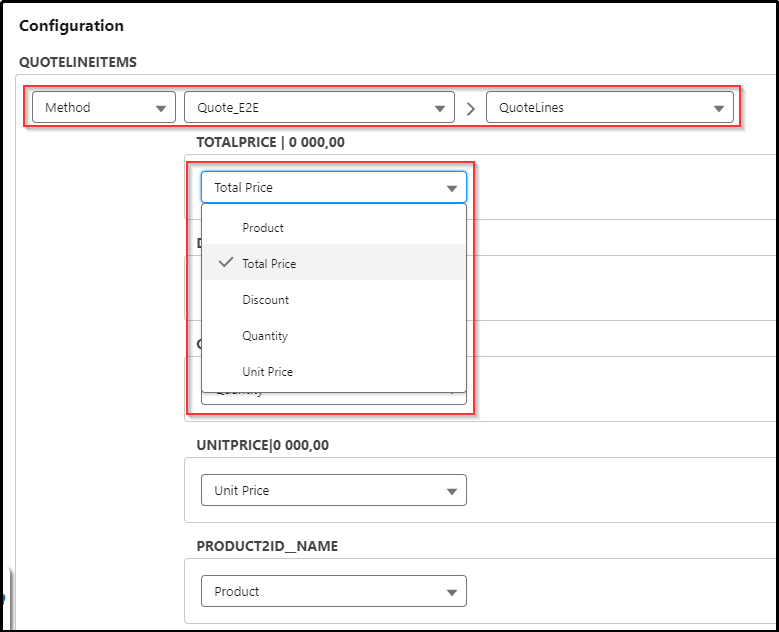
After the correct class is created, it is available for selection when the “Method” data source is selected on the Template Configuration record page under the Configuration section.
Interface Methods
getAvailableTokensWithLabels()
Map<String, ave.ApexDataProviderTokenLabelInfo> getAvailableTokensWithLabels();
Returns the token definitions that appear in the template editor. Each entry maps a token key (internal identifier) to an ave.ApexDataProviderTokenLabelInfo (human-readable label shown in the UI).
There are two primary kinds of tokens:
| Token Type | Description | Usage |
| Single value | A simple placeholder (e.g., account name). | new ave.ApexDataProviderTokenLabelInfo('Label') — no children. |
| Iteration (table) | A repeating group of values (e.g., table rows). | Create with a label, then call .addChild(key, label) for each column. |
getDataSource()
ave.DataSourceWrapper getDataSource(ave.TemplateApexDataProviderContext context);
Returns the actual data for document generation. It is called with a context containing:
context.getRecordIds()— the Salesforce record IDs the document is being generated for.context.getConfigurationId()— the template configuration ID.context.isDocumentPreview()—trueduring preview (UI).context.isDocumentGeneration()—trueduring actual generation.
Supporting Classes (ave namespace)
ave.ApexDataProviderTokenLabelInfo
| Constructor / Method | Description |
ave.ApexDataProviderTokenLabelInfo(String label) | Simple token with a display label. |
ave.ApexDataProviderTokenLabelInfo(String label, Map<String,String> childs) | Token with child columns (for iterations). |
.addChild(String value, String label) | Add a child column (returns this for chaining). |
ave.DataSourceWrapper
Top-level container that maps record IDs to their data.
| Method | Description |
.addForRecord(String recordId) | Returns an ave.DataSourceRecordWrapper for the given record ID (creates one if not present). |
ave.DataSourceRecordWrapper
Holds token values for a single record. All mutators return this instance for fluent chaining.
| Method | Description |
.addValue(String key, Object value) | Set a single token value. |
.addTable(String tableKey) | Initialize an empty table (iteration). |
.addTableRecord(String tableKey, Map<String, Object> record) | Add a row to a table as a map. |
.addTableRecord(String tableKey, ave.DataSourceRecordWrapper record) | Add a row using a wrapper. |
Code Examples
Example 1: Simple Single-Value Tokens
Provide account fields as tokens in a document. In the template, use tokens like {{account_name}}, {{account_phone}}, {{account_industry}}.
Apex
global with sharing class AccountDataProvider implements ave.TemplateApexDataProvider {

    global Map<String, ave.ApexDataProviderTokenLabelInfo> getAvailableTokensWithLabels() {
        Map<String, ave.ApexDataProviderTokenLabelInfo> tokens = new Map<String, ave.ApexDataProviderTokenLabelInfo>();

        tokens.put('account_name', new ave.ApexDataProviderTokenLabelInfo('Account Name'));
        tokens.put('account_phone', new ave.ApexDataProviderTokenLabelInfo('Phone'));
        tokens.put('account_industry', new ave.ApexDataProviderTokenLabelInfo('Industry'));

        return tokens;
    }

    global ave.DataSourceWrapper getDataSource(ave.TemplateApexDataProviderContext context) {
        ave.DataSourceWrapper dataSource = new ave.DataSourceWrapper();

        List<Account> accounts = [
            SELECT Id, Name, Phone, Industry
            FROM Account
            WHERE Id IN :context.getRecordIds()
            WITH SECURITY_ENFORCED
        ];

        for (Account acc : accounts) {
            dataSource.addForRecord(acc.Id)
                .addValue('account_name', acc.Name)
                .addValue('account_phone', acc.Phone)
                .addValue('account_industry', acc.Industry);
        }

        return dataSource;
    }
}
Example 2: Iteration (Table) — Related Contacts
Render a table of contacts related to an account.
Apex
global with sharing class AccountContactsDataProvider implements ave.TemplateApexDataProvider {

    global Map<String, ave.ApexDataProviderTokenLabelInfo> getAvailableTokensWithLabels() {
        Map<String, ave.ApexDataProviderTokenLabelInfo> tokens = new Map<String, ave.ApexDataProviderTokenLabelInfo>();

        // Single value token
        tokens.put('account_name', new ave.ApexDataProviderTokenLabelInfo('Account Name'));

        // Iteration token — a table with columns
        ave.ApexDataProviderTokenLabelInfo contactsTable = new ave.ApexDataProviderTokenLabelInfo('Account Contacts');
        contactsTable.addChild('contact_name', 'Full Name');
        contactsTable.addChild('contact_email', 'Email');
        contactsTable.addChild('contact_title', 'Title');
        contactsTable.addChild('contact_phone', 'Phone');
        tokens.put('contacts_table', contactsTable);

        return tokens;
    }

    global ave.DataSourceWrapper getDataSource(ave.TemplateApexDataProviderContext context) {
        ave.DataSourceWrapper dataSource = new ave.DataSourceWrapper();

        List<Account> accounts = [
            SELECT Id, Name,
                (SELECT Id, Name, Email, Title, Phone FROM Contacts ORDER BY Name)
            FROM Account
            WHERE Id IN :context.getRecordIds()
            WITH SECURITY_ENFORCED
        ];

        for (Account acc : accounts) {
            dataSource.addForRecord(acc.Id)
                .addValue('account_name', acc.Name);

            for (Contact con : acc.Contacts) {
                dataSource.addForRecord(acc.Id)
                    .addTableRecord('contacts_table', new ave.DataSourceRecordWrapper()
                        .addValue('contact_name', con.Name)
                        .addValue('contact_email', con.Email)
                        .addValue('contact_title', con.Title)
                        .addValue('contact_phone', con.Phone)
                    );
            }
        }

        return dataSource;
    }
}
Example 3: Grouping Data by a Field
Generate a table of opportunity line items grouped by product family, with subtotals per group. This groups line items by Product2.Family, outputs them in order, and includes a family_subtotal value on the first row of each group (useful for merged cells or conditional display in the template).
Apex
global with sharing class GroupedLineItemsDataProvider implements ave.TemplateApexDataProvider {

    global Map<String, ave.ApexDataProviderTokenLabelInfo> getAvailableTokensWithLabels() {
        Map<String, ave.ApexDataProviderTokenLabelInfo> tokens = new Map<String, ave.ApexDataProviderTokenLabelInfo>();

        tokens.put('opportunity_name', new ave.ApexDataProviderTokenLabelInfo('Opportunity Name'));
        tokens.put('total_amount', new ave.ApexDataProviderTokenLabelInfo('Total Amount'));

        ave.ApexDataProviderTokenLabelInfo lineItemsTable = new ave.ApexDataProviderTokenLabelInfo('Line Items by Family');
        lineItemsTable.addChild('product_family', 'Product Family');
        lineItemsTable.addChild('product_name', 'Product Name');
        lineItemsTable.addChild('quantity', 'Quantity');
        lineItemsTable.addChild('unit_price', 'Unit Price');
        lineItemsTable.addChild('total_price', 'Total Price');
        lineItemsTable.addChild('family_subtotal', 'Family Subtotal');
        tokens.put('line_items', lineItemsTable);

        return tokens;
    }

    global ave.DataSourceWrapper getDataSource(ave.TemplateApexDataProviderContext context) {
        ave.DataSourceWrapper dataSource = new ave.DataSourceWrapper();

        List<Opportunity> opps = [
            SELECT Id, Name, Amount,
                (SELECT Id, Product2.Name, Product2.Family, Quantity, UnitPrice, TotalPrice
                 FROM OpportunityLineItems
                 ORDER BY Product2.Family, Product2.Name)
            FROM Opportunity
            WHERE Id IN :context.getRecordIds()
            WITH SECURITY_ENFORCED
        ];

        for (Opportunity opp : opps) {
            dataSource.addForRecord(opp.Id)
                .addValue('opportunity_name', opp.Name)
                .addValue('total_amount', opp.Amount);

            // Group line items by Product Family
            Map<String, List<OpportunityLineItem>> groupedItems = new Map<String, List<OpportunityLineItem>>();

            for (OpportunityLineItem oli : opp.OpportunityLineItems) {
                // Fixed wrap to keep ternary operator on one line for better readability
                String family = oli.Product2.Family != null ? oli.Product2.Family : 'Other';

                if (!groupedItems.containsKey(family)) {
                    groupedItems.put(family, new List<OpportunityLineItem>());
                }
                groupedItems.get(family).add(oli);
            }

            // Output rows sorted by family, with subtotals on the first row of each group
            for (String family : groupedItems.keySet()) {
                Decimal familySubtotal = 0;
                List<OpportunityLineItem> items = groupedItems.get(family);

                for (OpportunityLineItem oli : items) {
                    familySubtotal += oli.TotalPrice != null ? oli.TotalPrice : 0;
                }

                for (Integer i = 0; i < items.size(); i++) {
                    OpportunityLineItem oli = items[i];

                    ave.DataSourceRecordWrapper row = new ave.DataSourceRecordWrapper()
                        .addValue('product_family', family)
                        .addValue('product_name', oli.Product2.Name)
                        .addValue('quantity', oli.Quantity)
                        .addValue('unit_price', oli.UnitPrice)
                        .addValue('total_price', oli.TotalPrice)
                        .addValue('family_subtotal', i == 0 ? familySubtotal : null);

                    dataSource.addForRecord(opp.Id)
                        .addTableRecord('line_items', row);
                }
            }
        }

        return dataSource;
    }
}
Example 4: Using Preview vs. Generation Context
Return different data depending on whether the user is previewing or generating.
Apex
global with sharing class ContextAwareDataProvider implements ave.TemplateApexDataProvider {

    global Map<String, ave.ApexDataProviderTokenLabelInfo> getAvailableTokensWithLabels() {
        Map<String, ave.ApexDataProviderTokenLabelInfo> tokens = new Map<String, ave.ApexDataProviderTokenLabelInfo>();

        tokens.put('generated_date', new ave.ApexDataProviderTokenLabelInfo('Generated Date'));
        tokens.put('status', new ave.ApexDataProviderTokenLabelInfo('Status'));

        return tokens;
    }

    global ave.DataSourceWrapper getDataSource(ave.TemplateApexDataProviderContext context) {
        ave.DataSourceWrapper dataSource = new ave.DataSourceWrapper();

        for (String recordId : context.getRecordIds()) {
            ave.DataSourceRecordWrapper record = dataSource.addForRecord(recordId)
                .addValue('generated_date', Date.today().format());

            if (context.isDocumentPreview()) {
                record.addValue('status', 'PREVIEW — not final');
            } else if (context.isDocumentGeneration()) {
                record.addValue('status', 'FINAL');
            }
        }

        return dataSource;
    }
}
Example 5: Formatting dates with full month name to different languages
Salesforce every time returns full and short month name from MMMM and MMM date time format in English language. To adjust returned formatted date, we need to localize it manually. For this case we can use data provider, which will replace english month name to any other language. Below example is for German language, Account object and CreatedDate field, but can be easily adjusted to any language, object and field.
Apex
global with sharing class AveneerDateFormatProvider implements ave.TemplateApexDataProvider {

    Map<String, String> MONTH_TO_FULL_NAME_EN_MAP = new Map<String, String> {
            '01' => 'January',
            '02' => 'February',
            '03' => 'March',
            '04' => 'April',
            '05' => 'May',
            '06' => 'June',
            '07' => 'July',
            '08' => 'August',
            '09' => 'September',
            '10' => 'October',
            '11' => 'November',
            '12' => 'December'
    };

    Map<String, String> MONTH_TO_FULL_NAME_DE_MAP = new Map<String, String> {
            '01' => 'Januar',
            '02' => 'Februar',
            '03' => 'März',
            '04' => 'April',
            '05' => 'Mai',
            '06' => 'Juni',
            '07' => 'Juli',
            '08' => 'August',
            '09' => 'September',
            '10' => 'Oktober',
            '11' => 'November',
            '12' => 'Dezember'
    };

    Map<String, String> MONTH_TO_SHORT_NAME_EN_MAP = new Map<String, String> {
            '01' => 'Jan',
            '02' => 'Feb',
            '03' => 'Mar',
            '04' => 'Apr',
            '05' => 'May',
            '06' => 'Jun',
            '07' => 'Jul',
            '08' => 'Aug',
            '09' => 'Sep',
            '10' => 'Oct',
            '11' => 'Nov',
            '12' => 'Dec'
    };

    Map<String, String> MONTH_TO_SHORT_NAME_DE_MAP = new Map<String, String> {
            '01' => 'Jan',
            '02' => 'Feb',
            '03' => 'Mär',
            '04' => 'Apr',
            '05' => 'Mai',
            '06' => 'Jun',
            '07' => 'Jul',
            '08' => 'Aug',
            '09' => 'Sep',
            '10' => 'Okt',
            '11' => 'Nov',
            '12' => 'Dez'
    };

    global Map<String, ave.ApexDataProviderTokenLabelInfo> getAvailableTokensWithLabels() {
        Map<String, ave.ApexDataProviderTokenLabelInfo> labels = new Map<String, ave.ApexDataProviderTokenLabelInfo>();

        // labels for Today and CreatedDate with full month name
        labels.put('today_ddMMMMyyyy_de', new ave.ApexDataProviderTokenLabelInfo('Today dd MMMM yyyy (de)'));
        labels.put('createdDate_ddMMMMyyyy_de', new ave.ApexDataProviderTokenLabelInfo('CreatedDate dd MMMM yyyy (de)'));

        // labels for Today and CreatedDate with short month name (abbreviated)
        labels.put('today_ddMMMyyyy_de', new ave.ApexDataProviderTokenLabelInfo('Today dd MMM yyyy (de)'));
        labels.put('createdDate_ddMMMyyyy_de', new ave.ApexDataProviderTokenLabelInfo('CreatedDate dd MMM yyyy (de)'));

        return labels;
    }

    global ave.DataSourceWrapper getDataSource(ave.TemplateApexDataProviderContext context) {
        ave.DataSourceWrapper dataSource = new ave.DataSourceWrapper();
        List<String> recordIds = context.getRecordIds();

        // this example assume that recordId is from Account object, but it can be any object
        Map<Id, Account> accountsMap = new Map<Id, Account>([SELECT Id, CreatedDate FROM Account WHERE Id IN :recordIds]);

        for (String recordId : recordIds) {
            if (accountsMap.containsKey(recordId)) {
                Datetime createdDate = accountsMap.get(recordId).CreatedDate;

                dataSource.addForRecord(recordId)
                        // format today date to "dd MMMM yyyy" date format, and replace full month name from english to german based on map with full month names
                        .addValue('today_ddMMMMyyyy_de', DateTime.now().format('dd MMMM yyyy').replace(MONTH_TO_FULL_NAME_EN_MAP.get(DateTime.now().format('MM')), MONTH_TO_FULL_NAME_DE_MAP.get(DateTime.now().format('MM'))))
                        // format createdDate (it can be any date time field) to "dd MMMM yyyy" date format, and replace full month name from english to german based on map with full month names
                        .addValue('createdDate_ddMMMMyyyy_de', createdDate.format('dd MMMM yyyy').replace(MONTH_TO_FULL_NAME_EN_MAP.get(createdDate.format('MM')), MONTH_TO_FULL_NAME_DE_MAP.get(createdDate.format('MM'))))
                        // format today date to "dd MMM yyyy" date format, and replace short month name from english to german based on map with short month names
                        .addValue('today_ddMMMyyyy_de', DateTime.now().format('dd MMM yyyy').replace(MONTH_TO_SHORT_NAME_EN_MAP.get(DateTime.now().format('MM')), MONTH_TO_SHORT_NAME_DE_MAP.get(DateTime.now().format('MM'))))
                        // format createdDate (it can be any date time field) to "dd MMM yyyy" date format, and replace short month name from english to german based on map with short month names
                        .addValue('createdDate_ddMMMyyyy_de', createdDate.format('dd MMM yyyy').replace(MONTH_TO_SHORT_NAME_EN_MAP.get(createdDate.format('MM')), MONTH_TO_SHORT_NAME_DE_MAP.get(createdDate.format('MM'))));
            }
        }

        return dataSource;
    }
}
Key Rules
- Token keys must match: The same string keys used in
getAvailableTokensWithLabels()must be used inaddValue()/addTableRecord()calls ingetDataSource(). - Always iterate over
context.getRecordIds(): Aveneer may generate documents for multiple records in a single call. CalldataSource.addForRecord(recordId)for each one. - Class Signatures: The class must be declared as
globaland implementave.TemplateApexDataProvider. - Iteration Tokens: The parent
ave.ApexDataProviderTokenLabelInfolabel describes the table/group name, while.addChild()entries describe individual columns within that iteration. - Namespace Prefixes: All managed package types must be referenced with the
ave.namespace prefix (e.g.,ave.DataSourceWrapper,ave.DataSourceRecordWrapper,ave.ApexDataProviderTokenLabelInfo,ave.TemplateApexDataProviderContext).